
What players say
Coolmather Avatar Creator keeps its scope narrow and executes it cleanly. The category-based selection of hair, tops, bottoms, shoes, and accessories, combined with color adjustments on many items, gives enough variety for personal expression without overwhelming the user. The save-as-image function turns each design into something shareable, which is the real payoff. It will not satisfy players looking for complex 3D modeling or deep narrative, but as a relaxed, family-safe creative tool it does what it claims.
About this game
Building a Character From the Base Up
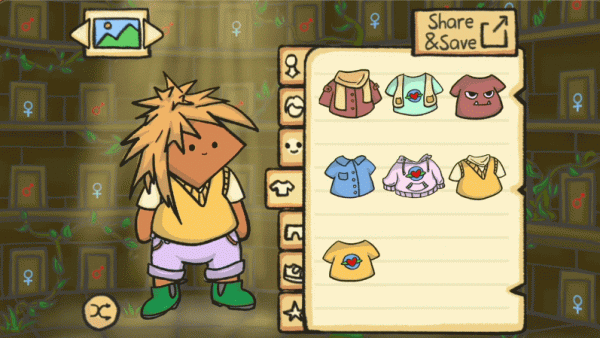
Coolmather Avatar Creator starts with a single decision: pick the base figure. Everything after that is layered on top of it. The categories are separated into hair, tops, bottoms, shoes, and accessories, and clicking any item applies it to the avatar immediately. Because the preview updates in real time, you can judge whether a jacket works with a particular pair of pants before committing to it. [IMG_1]
Color Choices and Visual Mixing
Many items support color changes, which is where the tool becomes more than a simple dress-up sheet. A hairstyle can be recolored, a top can be shifted to match a preferred palette, and accessories can be adjusted to fit the overall look. This matters because two players using the same clothing items can still produce completely different avatars simply by changing the color values. The interface keeps these controls visible, so experimentation stays quick rather than menu-heavy.
Saving and Sharing the Finished Avatar
When the design feels right, a save button downloads the avatar as an image file. That file is the end product. It can be uploaded to a social media profile or sent directly to friends. Nothing about the process requires drawing skill, prior experience, or account setup based on the description. The whole loop is choose, preview, adjust, save. [IMG_2]
Who the Tool Suits
Coolmather Avatar Creator is family-safe and works on most devices with a web browser. It is aimed at anyone who wants a quick visual representation of themselves or an imagined character. Younger players can use it without supervision because the content is appropriate for children and adults. Older players who enjoy palette matching or outfit coordination will find the color options more useful than the basic item list suggests.
Compatibility
FAQ
Player Comments
Sign in to comment
You must be logged in before posting a review or rating.
No comments yet. Be the first to comment!





Editorial Notes