
What players say
Face Play Studio succeeds as a lightweight creative sandbox because it removes every layer of competition and scoring. The drag-point controls respond instantly, and the browser-based design means no installation stands between a player and a silly expression. Its appeal is strongest for families, casual users, and anyone who wants a screen-based activity that works on both desktop and mobile. The trade-off is depth: without objectives or progression, sessions tend to be short and driven by curiosity rather than sustained engagement.
About this game
A Canvas With No Rules
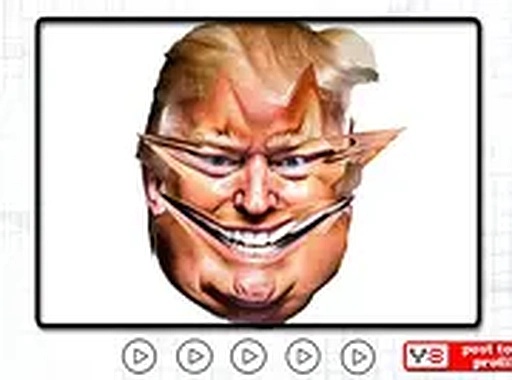
Face Play Studio opens with a single neutral portrait and a set of drag points mapped to individual facial features. There is no timer, no score, and no win condition. The only goal is experimentation: pull the eyes wide or narrow, stretch the nose sideways, curve the mouth into an exaggerated grin or frown. Every adjustment triggers an immediate visual response, so the feedback loop stays tight and playful. Because nothing is graded, players set their own stopping point.Touch, Mouse, and Instant Access
The game runs entirely in a web browser, so there is nothing to download or install. Controls respond to both mouse input on desktop and touch on phones or tablets, which means the same session works across devices without setup. Starting a fresh face takes only a moment, and the uncluttered interface lets even young children participate without instruction. That low barrier makes it easy to hand a screen to someone nearby and share the result.Simple Tools, Wide Range
Each face begins as a neutral portrait, but combining adjustments across multiple points produces a surprisingly broad spectrum of expressions. Some results stay subtle, while others become heavily distorted. The design encourages revisiting the same face to see how stacked changes alter the overall impression. This open-ended structure keeps repeat sessions from feeling identical, even though the underlying toolset never changes.Built for Shared Laughter
Face Play Studio is deliberately non-competitive and contains no violence or inappropriate material. Its tone is lighthearted, making it suitable for parents who want a safe creative activity for children. Groups can gather around one screen and suggest adjustments together, turning the game into a conversation starter or a relaxed way to unwind after a busy day.Compatibility
💻 Desktop | 📱 Mobile | 📟 Tablet
– All supported · Best with Chrome or Safari
FAQ
Does Face Play Studio require any download or account?
No. Face Play Studio runs directly in a web browser, so there is no installation step and no account creation. You open the page and start adjusting a face immediately. This also means the game works on desktop and mobile devices as long as you have a browser and an internet connection.
Can I save or share the faces I create?
The input describes sharing a funny face with someone nearby, which suggests screen-to-screen sharing rather than a built-in export or save feature. The game does not mention cloud saves, file downloads, or social media integration, so treat each creation as a temporary session unless the current version adds options not described here.
Is Face Play Studio suitable for very young children?
Yes. The controls are drag points that respond to touch or mouse, and the interface is simple enough that children can use it without instruction. The content is non-violent and non-competitive, and there are no objectives or scores that could create pressure. Parents can let young children explore independently.
How many different expressions can I make?
The input does not specify a fixed number, but it emphasizes that combining adjustments across multiple points produces an enormous variety of looks. Some results are subtle and others are heavily distorted. Because each feature can be pushed independently, the practical range depends on how many points you adjust and how far you push them.
Does the game work on a phone or tablet?
Yes. The controls are designed to work equally well with a mouse on desktop or with touch on a phone or tablet. There is no separate mobile version to install. As long as the browser loads the page, you can drag points and reshape features using your finger instead of a cursor.
Is there any scoring, timer, or competitive mode?
No. Face Play Studio has no objectives to complete and no scores to beat. The entire experience is about exploring what happens when you push a feature to its limit. There is no competitive pressure, no timer, and no win or lose state. The only measure of success is whether the result makes you laugh.
Player Comments
Sign in to comment
You must be logged in before posting a review or rating.
No comments yet. Be the first to comment!








Editorial Notes