
What players say
Lexicon Quest keeps its scope narrow: type the correct spelling before time expires. That narrowness is a strength for players who want short, repeatable practice. The four themed worlds give the word pool meaningful variety, and Daily Hunt supports a consistent routine. The main limitation is that the input describes no multiplayer, story, or advanced progression beyond streak tracking. It is a browser-based spelling drill, not a narrative puzzle adventure.
About this game
Typing Against the Clock
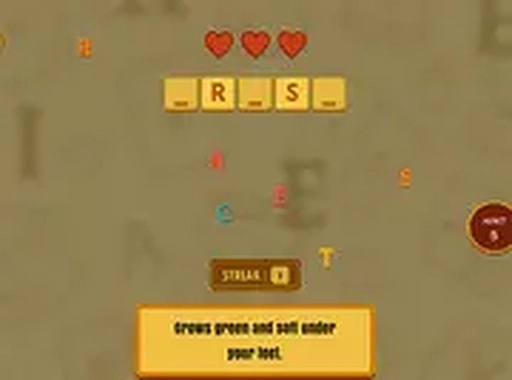
Lexicon Quest asks one thing of the player: spell the prompted word correctly before time runs out. Each correct entry adds points and extends a streak; mistakes are highlighted immediately so the correct spelling is visible. This feedback loop is the entire skill curve. Speed matters, but accuracy determines whether a streak survives. The game rewards players who slow down just enough to avoid typos while still beating the timer.
Four Themed Vocabulary Worlds
The game splits its word pool across four distinct settings: Tech, Nature, Space, and Country. These themes are not decorative. They change which words appear. Space leans toward terms like asteroid or nebula, while Nature draws from flora and fauna. Country presumably pulls from geography or cultural vocabulary. Because each world has its own lexical focus, players naturally encounter words they might not see in a general spelling list. Switching between worlds becomes a way to broaden vocabulary rather than just repeat the same set of prompts.
Daily Hunt and Random Mode
Two modes structure how players engage. Daily Hunt delivers one new word per day, which suits a short routine visit. Random Mode serves an unpredictable word, testing adaptability rather than memorization. Both modes log longest streaks and overall performance, so progress is visible over time. The design accommodates both quick sessions and longer play without forcing a specific commitment level.
Browser-Based, Input-Agnostic
Lexicon Quest runs in a web browser with no download or installation. It supports both touchscreen and physical keyboards, and a full-screen option reduces visual distractions. The interface is intentionally simple, which keeps the focus on the spelling task itself. That simplicity also makes the game approachable for a wide age range, from casual word enthusiasts to players specifically training speed and accuracy.
Compatibility
FAQ
Player Comments
Sign in to comment
You must be logged in before posting a review or rating.
No comments yet. Be the first to comment!








Editorial Notes